 Subcut
What Is the APPLE.COM/BILL Charge on Your Statement?
What is the APPLE.COM/BILL charge on your statement? It is any Apple Account purchase. Here is how to find the exact app and stop it for good.
You are scanning your statement, everything looks normal, and then there it is: APPLE.COM/BILL. No app name. No service. Just Apple's web address and an amount you may or may not remember agreeing to. For a second you wonder if your card got skimmed.
Here is the short answer. APPLE.COM/BILL (older cards may show ITUNES.COM/BILL) is the single line Apple puts on a statement for any purchase made through your Apple Account. As Apple's own support page on apple.com/bill charges puts it, the charge "could be for apps, subscriptions, music and movie purchases, or more from Apple." App Store apps, in-app purchases, iCloud+, Apple Music, Apple TV+, Apple Arcade, and third-party app subscriptions billed through Apple all collapse into that one descriptor. The statement line never tells you which one. That is by design, not a glitch.
So the charge is almost always legitimate. The real question, the one Apple's page answers slowly and scatters across two documents, is: which thing is it, and how do you make it stop? This page is the decoder. We will defuse the panic first, then walk a decision tree that pins the exact subscription, including the cause Apple barely mentions, and then show you how to actually stop the charge instead of just thinking you did.
First: why this charge is so common (and probably not fraud)
A quick gut-check before the detective work. Apple's billing scale is enormous, which is the boring reason an unrecognized Apple line is far more likely a forgotten subscription than fraud. As of its Q1 FY2025 earnings (the quarter ending December 28, 2024), Apple reported more than 1 billion paid subscriptions across its services, a figure that explicitly includes third-party apps in the App Store, per TechCrunch's report of the earnings. That "including third-party apps" clause is the load-bearing detail. Your APPLE.COM/BILL line could be Apple Music, or it could be some meditation app you trialed in 2023 and forgot. Both bill through the same plumbing.
Forgetting is the norm, not a personal failing. In its 2022 subscription study, C+R Research found that 42% of people had been paying for a subscription they no longer used, and 74% said it was easy to forget about a recurring monthly charge. The same survey found people guessed they spent about $86 a month on subscriptions when the itemized reality averaged $219. A mystery Apple charge is usually one of those forgotten lines surfacing, not a thief.
Fraud or forgotten subscription? A 10-second triage
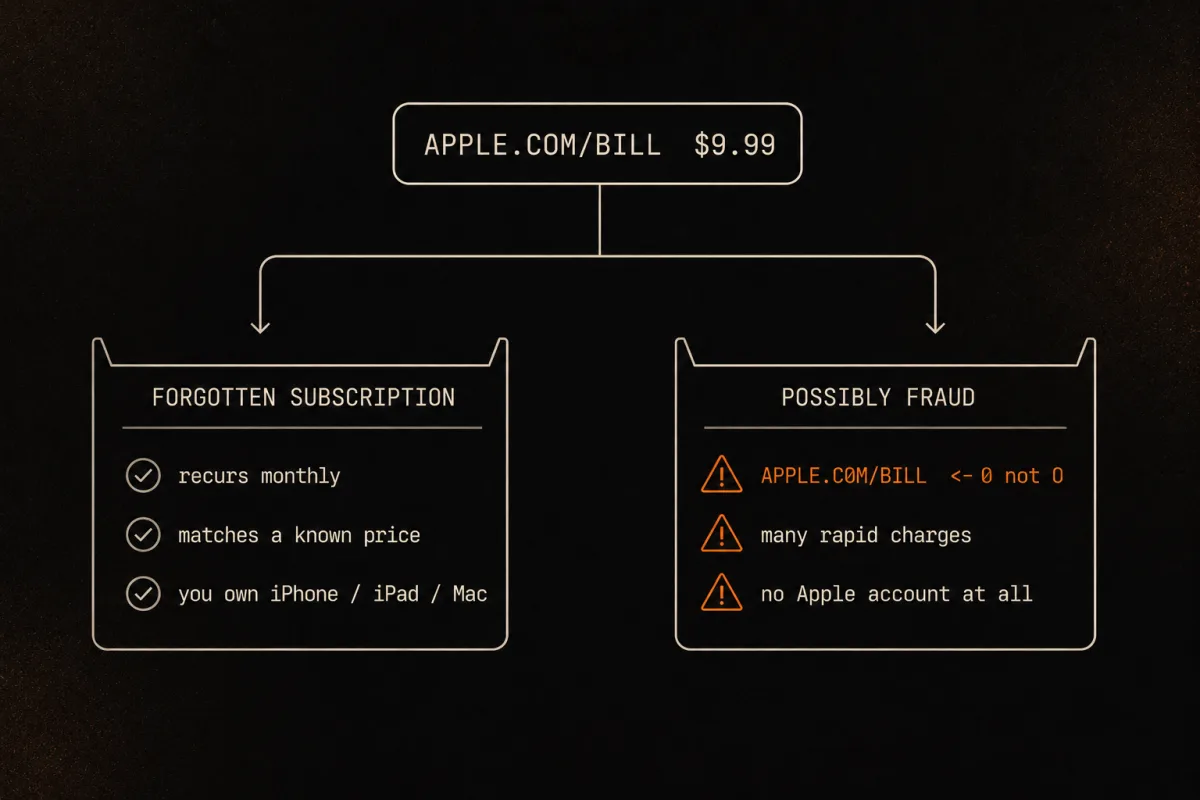
Before you dig, sort the charge into one of two buckets. Most readers land in the first.
| Probably a forgotten subscription | Possibly actual fraud |
|---|---|
| The amount matches a known price ($0.99, $2.99, $9.99, $16.99) | You own no Apple devices and have no Apple Account |
| It recurs on a steady monthly or annual cadence | The billing text is subtly misspelled (a "1" in place of an "l", odd spacing) |
| You own iPhones, iPads, or Macs | Several rapid-fire charges appear in a short window |
| Family members use your Apple Account | The charge appears nowhere in your Apple purchase history |
If you are in the left column, keep reading; this is a "which app" problem, and the decision tree below solves it. If you are in the right column, skip to confirming at Apple's Report a Problem tool. If Apple shows no matching purchase, it is not Apple's charge and your bank handles it from there, as Apple itself directs in its guidance on Apple Services charges you don't recognize.
A note on the misspelling tell: phishing texts and emails sometimes mimic the apple.com/bill wording to look like a real Apple notice. Apple does not text you a payment link. Identify charges inside Settings or at the real apple.com, never by tapping a link in a message.
The decision tree: pin the exact subscription
Work these in order. Most people find the answer by step 3. The ones who don't are usually missing step 5, which is the cause Apple's main page never explains.
Step 1: Check the source of truth, not the email
Receipts lie by omission. The real record is your purchase history. Go to reportaproblem.apple.com, sign in, and you will see every purchase with its date, amount, and the actual product name. On an iPhone, the same data lives in Settings, then your name, then Media & Purchases, then View Account, then Purchase History.
Step 2: Match by amount, but remember it can be batched
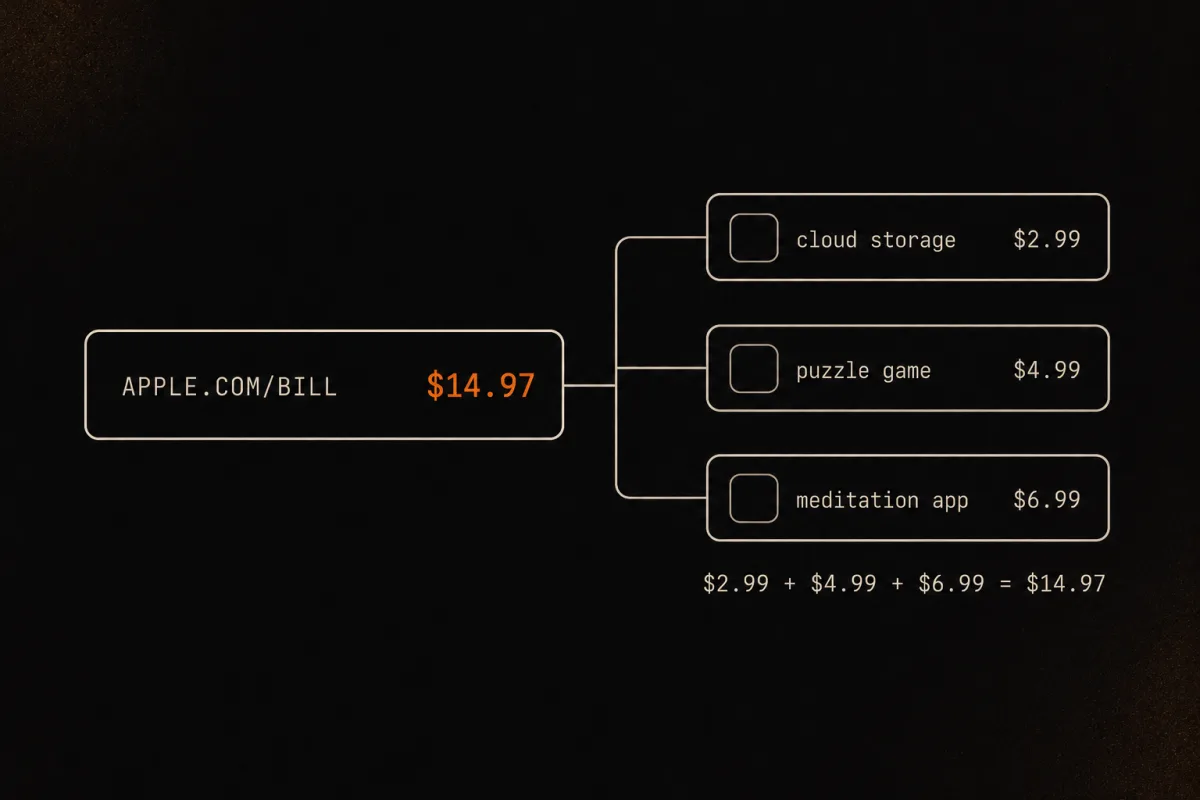
Here is the trap that breaks naive matching. Apple groups multiple purchases into one statement line. In its own words on the Apple Services charge page: "Multiple purchases might be grouped together as one line item on your PDF statement or on your transactions in the Wallet app, even if you made the purchases on different days." So a $14.97 charge can be three separate apps stacked together, and you will never find a single $14.97 subscription to explain it. Add up candidates instead of hunting for one perfect match.
The same Apple page adds two more spoilers worth knowing: you might not get a separate email receipt for each purchase, and charges sometimes post a few days after the purchase, so the statement date may not equal the day you actually bought anything. Date-matching alone will mislead you.
Step 3: Check subscriptions specifically
If you suspect a recurring charge rather than a one-time buy, go straight to the list. On an iPhone: Settings, your name, then Subscriptions. On the web: account.apple.com, then Subscriptions. This shows only the recurring stuff, active and recently expired, which is usually where a mystery monthly charge is hiding.
Step 4: Rule out a family member
If you are the organizer of a Family Sharing group with Purchase Sharing turned on, your card can be billed for the whole family's purchases. Ask the people in your group first. Then, as the organizer, you can switch to each member's account at reportaproblem.apple.com to see what they bought, which Apple documents on its apple.com/bill help page.
One important update so this advice isn't stale: as of iOS 26.4, adult members of a Family Sharing group can use their own payment method instead of the organizer's card, per MacRumors' March 2026 report. So "the organizer always pays for everyone" is no longer universal. It still holds for children's accounts and for families who never changed the default, but a knowledgeable reader should not assume it.
Step 5: Rule out a second or forgotten Apple Account
This is the one Apple's main page skips, and it is the single most common reason people get stuck after checking everywhere. An old iCloud login, a child's former device, a shared iPad, or an Apple Account you made years ago for one purchase can still hold an active subscription. That subscription bills your card, but it appears in the purchase history of an Apple Account you are not currently signed into, so you check and find nothing.
The fix: sign out, sign in with any older Apple Account you have ever used (an old email, a school or work account, the login on a hand-me-down device), and re-check both Purchase History and Subscriptions there. Apple Community threads on this resolve to a second Apple Account again and again; it is a documented, recurring pattern, not a fluke. If you have ever been "charged for a forgotten iCloud account," this step is why.
Step 6: Still nothing? Escalate
If all five steps turn up empty, contact Apple (in the US, 1-800-MY-APPLE) following the apple.com/bill guidance. If Apple confirms the charge isn't theirs, then and only then treat it as card fraud and call your bank.
How to actually stop the charge
Finding the subscription is half the job. Stopping it has one trap that catches almost everyone.
Deleting the app does not cancel the subscription. The app and the subscription are separate things. The subscription lives on your Apple Account and keeps renewing whether the app is installed or not. This is the single most common reason someone is sure they "already cancelled" while the APPLE.COM/BILL charge keeps arriving. The Apple Community consensus on whether deleting an app cancels its subscription is a flat no.
The only way to stop it:
- On iPhone: Settings, tap your name, tap Subscriptions, tap the subscription, then Cancel Subscription. (Path confirmed by Apple's cancel-a-subscription guide.)
- On the web: account.apple.com, sign in, open Subscriptions, then cancel.
Two more things worth knowing. If you are on a free trial, cancel at least 24 hours before it ends, or Apple bills you for the first paid period. And if a subscription you want gone does not appear in your Apple Subscriptions list, it is probably billed directly by the developer, not through Apple, so you cancel it with that company instead. Useful tell: those direct subscriptions usually do not read apple.com/bill. An apple.com/bill line is itself a signal that the thing is cancellable inside Apple.
For a refund on a charge you didn't mean to keep, request it at reportaproblem.apple.com. Apple grants refunds case by case, so it isn't guaranteed, but the request takes two minutes.
Why one line hides so much: the descriptor problem
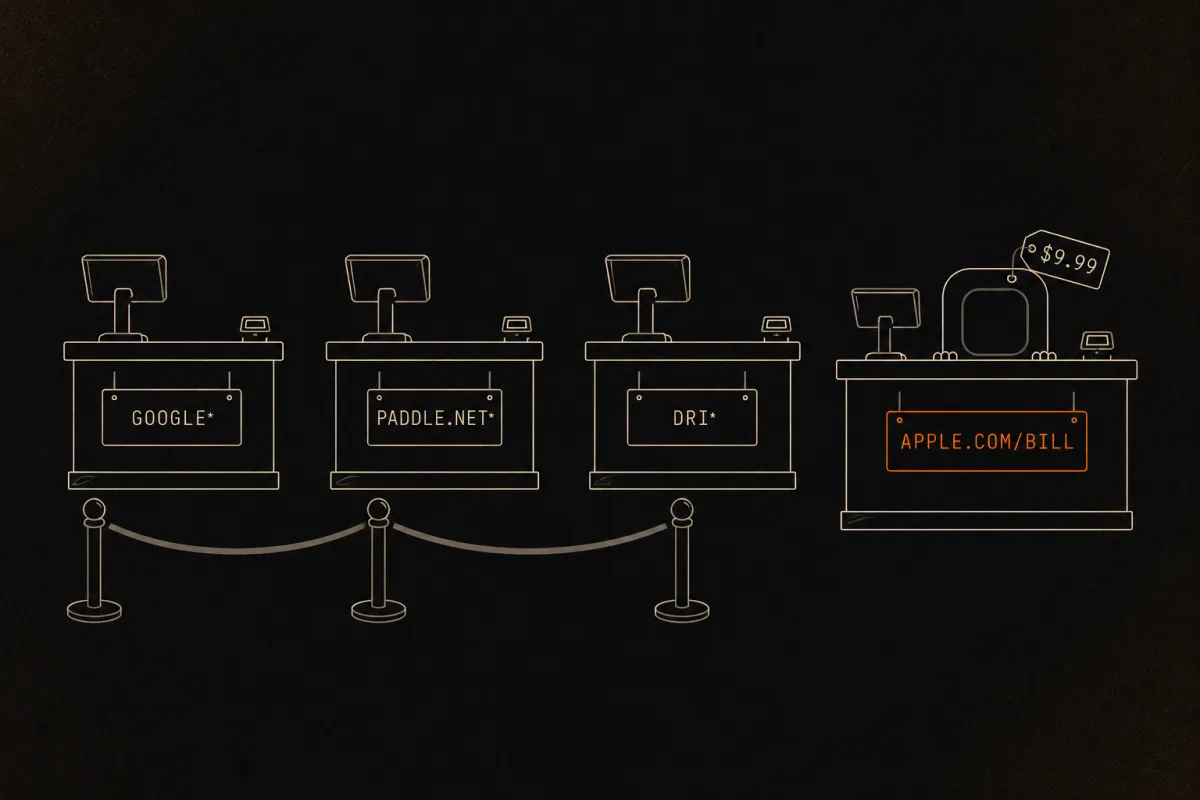
Step back and the deeper issue comes into focus. APPLE.COM/BILL is the most famous example of a statement descriptor that names the payment plumbing instead of the merchant. The line tells you the money went through Apple. It refuses to tell you what you bought. That is true of a whole family of opaque descriptors: GOOGLE * for Play Store purchases, PADDLE.NET* and DRI* for software sold through a merchant of record. In every case, the name on your statement is the cashier, not the product.
If you keep running into charges where the name does not match the app, the mechanics are worth understanding once. We break down the whole family in why a subscription shows a different name on your statement. It is the same decoding logic this page applies to Apple, generalized to every cryptic line you will ever see.
One place this bites hard right now: AI apps. A lot of them bill through Apple, so your APPLE.COM/BILL line could be quietly hiding a stack of $9.99 and $19.99 AI subscriptions you signed up for across a few months and never tallied. If that sounds plausible, here is how to figure out what you're actually spending on AI subscriptions.
How Subcut decodes it for you
Doing this by hand, one cryptic line at a time, is exactly the tedious work Subcut's statement import was built to skip. It reads your statement and turns opaque descriptors like APPLE.COM/BILL, GOOGLE *, and PADDLE.NET* back into the real apps and subscriptions behind them, then lays out every recurring charge in one place so you can decide what stays.
One honest note, because we would want it told to us. The import does not run on your phone. When you import a statement, the file goes to our import worker, which uses AI (Gemini and Claude) to read the descriptors and resolve them to clean names, then sends the results back. We will not tell you it stays on device, because it doesn't. Being straight about where your data goes is the floor, and more useful than a comforting fib.
Opaque Apple, Google, and merchant-of-record descriptors are exactly the kind of cryptic lines Subcut is built to decode, and the forgotten subscriptions hiding behind them are often the ones people are surprised to still be paying for.
If you have a statement in front of you and want to find every recurring charge on it, not just the Apple one, here is how to pull subscriptions off a bank statement without handing over a login.
See what that mystery Apple line actually is. Subcut reads your statement (the file goes to our import worker, it does not stay on your phone) and turns
APPLE.COM/BILLand friends back into the real apps, so you can finally see what you are paying for and cancel what you don't want.iOS · Free to use · No subscription required (ironic, we know).
Frequently asked questions
What is the APPLE.COM/BILL charge on my statement?
It is the single line Apple puts on your card or bank statement for any purchase made through your Apple Account. That covers App Store apps, in-app purchases, iCloud+, Apple Music, Apple TV+, Apple Arcade, and third-party app subscriptions billed through Apple. The statement line never names the specific app or service. To see what it was, open reportaproblem.apple.com and check your purchase history by date and amount.
How do I find out which app or subscription the APPLE.COM/BILL charge is for?
Go to reportaproblem.apple.com, sign in, and look at your purchase history, which lists every item by date, amount, and the actual product name. On an iPhone you can also open Settings, tap your name, then Media & Purchases, then View Account, then Purchase History. To see only recurring charges, open Settings, tap your name, then Subscriptions.
Why is my APPLE.COM/BILL charge an odd amount that doesn't match any subscription?
Because Apple can group multiple purchases into one line item, even purchases made on different days. A single charge that doesn't match any one subscription is often two or three smaller purchases added together. Apple also notes that charges can post a few days after the purchase, so the statement date may not equal the day you bought anything.
Is an APPLE.COM/BILL charge a scam?
Usually no. If you own Apple devices and the amount matches a known subscription price on a regular cadence, it is almost certainly a real Apple purchase. Treat it as suspicious only if you have no Apple account or devices, the billing text is subtly misspelled, or several rapid charges appear at once. Confirm at reportaproblem.apple.com. If Apple shows no matching purchase, contact your bank, because then it is a card issue, not an Apple one.
Can an APPLE.COM/BILL charge come from a family member?
Yes. If you are the organizer of a Family Sharing group with Purchase Sharing on, family members' purchases can be billed to your card. Ask the people in your group, and if you are the organizer, switch to each member's account at reportaproblem.apple.com to see their purchases. As of iOS 26.4, adult members can use their own payment method, so this is less universal than it used to be.
I checked my purchase history and still can't find the charge. Now what?
Check whether you have a second or old Apple Account. An old iCloud login, a child's former device, or a shared iPad can carry an active subscription on a different Apple Account that still resolves to your card. Sign out, sign in with any older Apple Account you have used, and re-check both Purchase History and Subscriptions there.
How do I stop APPLE.COM/BILL charges?
Cancel the subscription itself. On an iPhone, open Settings, tap your name, tap Subscriptions, tap the subscription, then Cancel Subscription. On the web, go to account.apple.com, sign in, open Subscriptions, and cancel. Deleting the app does not stop the charge, because the subscription lives on your Apple Account, not the app.
Keep going
Sources
- Apple Support: Get help with charges from apple.com/bill
- Apple Support: If you see an Apple Services charge you don't recognize on your Apple Card
- Apple Support: If you want to cancel a subscription from Apple
- Apple: Report a problem (purchase history and refund tool)
- TechCrunch: Apple tops 1 billion subscriptions, nearly $100 billion in services revenue in 2024
- C+R Research: Subscription service statistics and costs
- MacRumors: iOS 26.4 lets adults in a Family Sharing group use their own payment method
- Apple Community: Does deleting an app cancel a subscription?