 Subcut
Find Subscriptions From a Bank Statement (No Bank Login)
Find subscriptions from a bank statement with no bank login. Two honest paths: a free manual spreadsheet method, or a one-time statement import. No Plaid.
You want to know what you are actually paying for every month, and you do not want to type your bank password into some app to find out. Reasonable. Here is the direct answer: you can find every subscription on a bank statement with no bank login in two ways. Download 3 to 6 months of statements as a CSV or PDF and sort them by merchant in a spreadsheet, which never leaves your computer. Or upload one statement to a tool that reads the recurring charges for you. Neither one asks for your bank username, your password, or a standing connection to your account.
The catch most pages skip is what happens to the file once you upload it. We will get to that in plain language, because it is the whole point of searching "no bank login." First, the reason your statement is worth reading at all.
Why you cannot just eyeball it
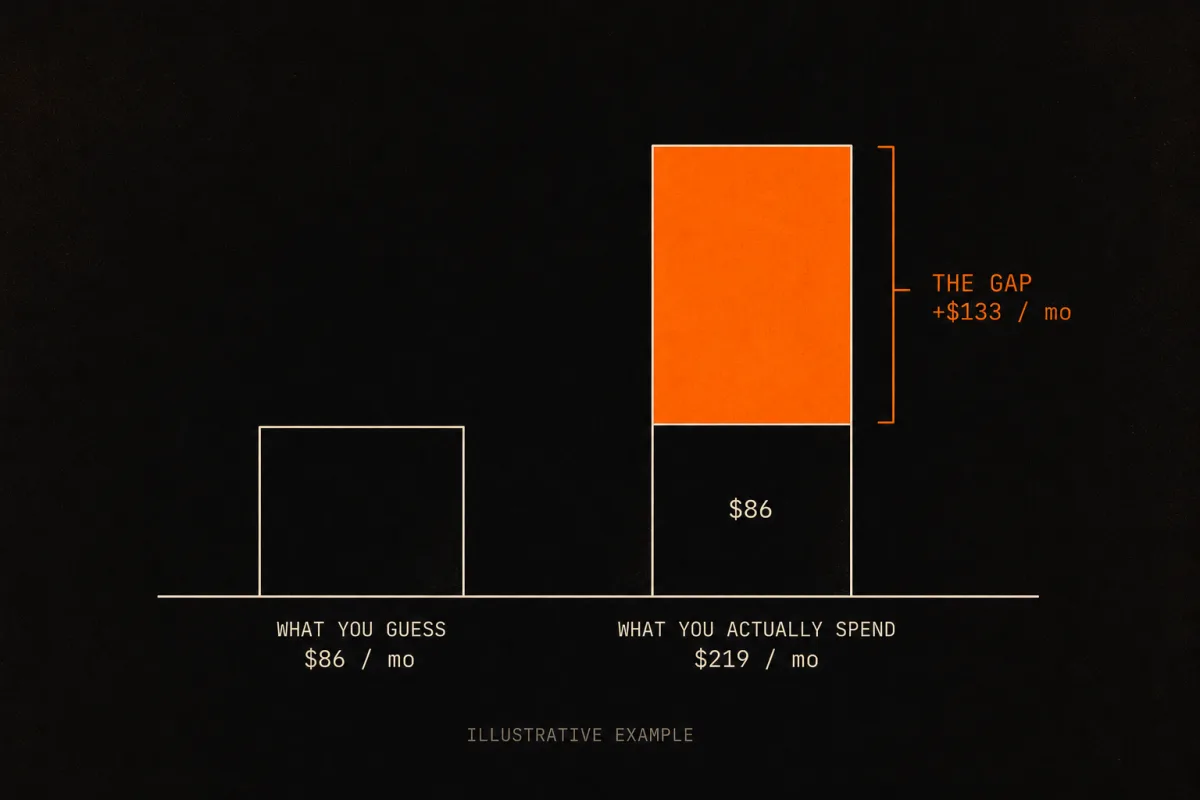
Almost nobody can estimate their subscription spend in their head. When C+R Research asked people to guess theirs in 2022, the average guess was $86 a month. When those same people itemized it, the real number was $219, a gap of $133 every month (C+R Research, 2022, corroborated by CNBC, 2022). That is not carelessness. It is what happens when 74% of people say recurring charges are easy to forget (C+R Research, 2022). A charge you never see is a charge you never question.
And it is probably you, specifically. A 2021 Chase survey of more than 2,000 Americans found that 60% had forgotten about at least one recurring payment in the past year (Chase, 2021). The statement is the only place that number stops being a guess.
The two no-login paths, side by side
There are two real ways to do this without a bank login, and they trade off against each other. One is free and fully local but tedious. One is fast but sends the file to a remote service. We will be straight about both, including the part where the convenient one is not as private as the manual one.
| Path A: Manual spreadsheet | Path B: Statement import (Subcut) | |
|---|---|---|
| Bank login required | No | No |
| What you hand over | Nothing leaves your computer | One statement file, once |
| Where the reading happens | On your own machine | A remote AI service (Gemini and Claude) |
| Standing connection to your bank | None | None |
| Speed | 30 to 60 minutes | About a minute |
| Best for | People who want nothing to leave their device | People who want it done fast and do not mind one upload |
There is a third option people search for, an auto-detect aggregator like Rocket Money, but it does require a bank connection, so it fails the "no login" test on its own terms. We cover it at the end so you can rule it in or out with eyes open.
Path A: The manual spreadsheet method (nothing leaves your computer)
This is the method every honest guide describes, and it works. It is also the only path here where "your statement never leaves your device" is literally true, so if that is your priority, this is your path.
1. Download 3 to 6 months of statements
Three months catches monthly and quarterly charges. Six months catches annual renewals, which only appear once a year and are exactly the ones people forget. CSV beats PDF if your bank offers it, because a CSV sorts cleanly and a PDF often needs to be read line by line.
The export step is where banks get fiddly, so here is the per-bank reality:
| Bank | How to get a CSV | Watch out for |
|---|---|---|
| Chase | Download account activity from the account details page | Defaults to QFX/Quicken format; you have to manually switch it to CSV |
| Bank of America | Statements & Documents, then Download Transactions, then pick CSV | Limited to 60 days per download, so a full year needs several chunks |
| Wells Fargo | Download Account Activity, then Comma Separated (.csv) | History runs up to 18 months on some accounts; default is 90 days |
Capital One and most credit unions also export CSV. If you only want the broad strokes, U.S. Bank keeps a plain walkthrough on finding and managing recurring charges on its own statements.
2. Sort by merchant so duplicates stack
Open the file in Numbers, Excel, or Google Sheets. Sort by the description or merchant column. Now every charge from the same place sits in a block, and a subscription is just the same merchant showing up at a regular interval for a similar amount.
3. Flag the repeats
Scan for a merchant that appears every month, every three months, or every year for roughly the same amount. A few price bands are worth a second look because they hide a lot of subscriptions: $4.99 to $5.99 (niche streaming, Twitch), $9.99 to $12.99 (music and standard video), and $14.99 to $19.99 (premium tiers and subscription boxes). Quarterly and annual charges are the sneaky ones, which is why you pulled six months.
4. Decode the descriptors you do not recognize
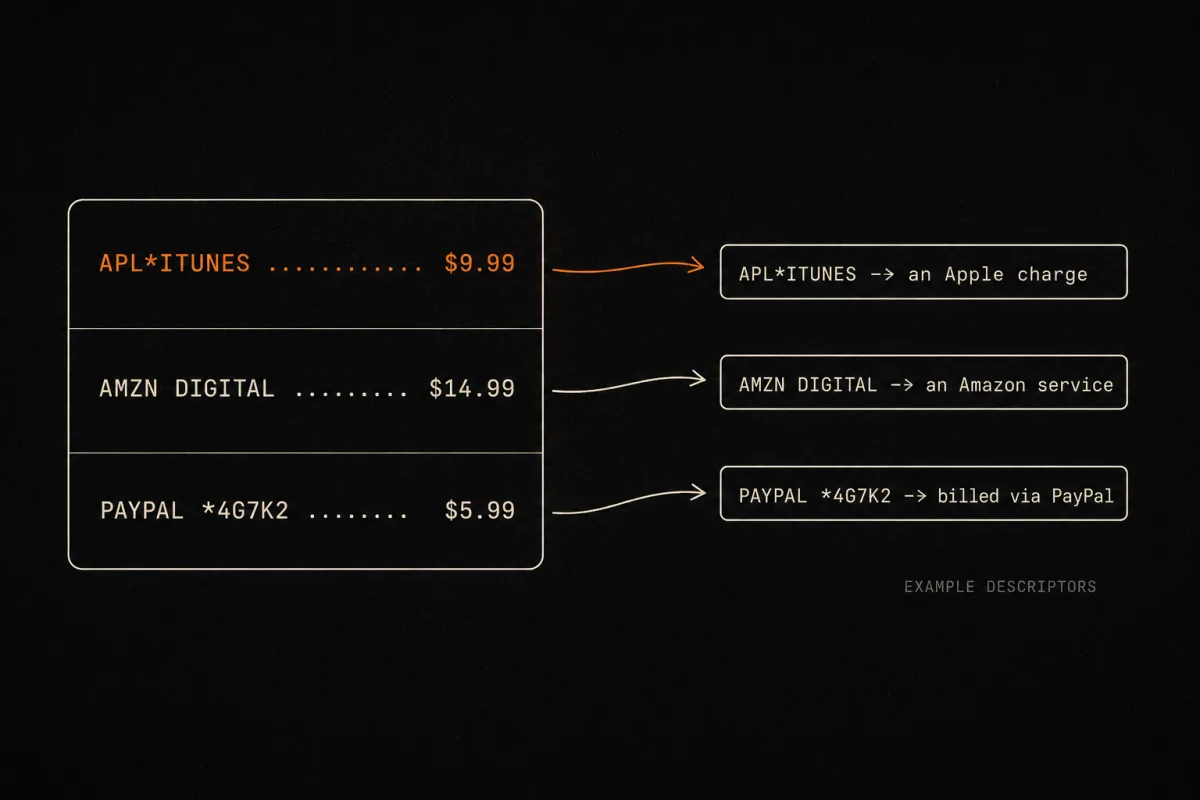
This is the part that breaks people. Your statement does not say "Apple Music." It says something like "APL*ITUNES," or "AMZN DIGITAL," or "PAYPAL *4G7K2." The brand name is frequently nowhere on the line, because the charge carries the payment processor's or the legal entity's name instead. Search the exact descriptor text, and if it is one of the common cryptic ones, our guide on why a subscription shows a different name on your statement decodes the usual suspects.
Do not forget the three blind spots that hide behind a single line item:
- Apple: Settings, then your name, then Subscriptions.
- PayPal: Settings, then Payments, then Manage Automatic Payments.
- Google Play: Profile, then Payments & subscriptions.
A single "APPLE.COM/BILL" line can be three subscriptions you are paying through one Apple account, and the statement will never break them out for you.
The manual method is free, private, and a little soul-crushing on a messy statement. If that tradeoff is fine with you, you are done after step four. If you would rather not spend an hour decoding processor codes, here is the other path.
Path B: Import the statement and let it get read for you
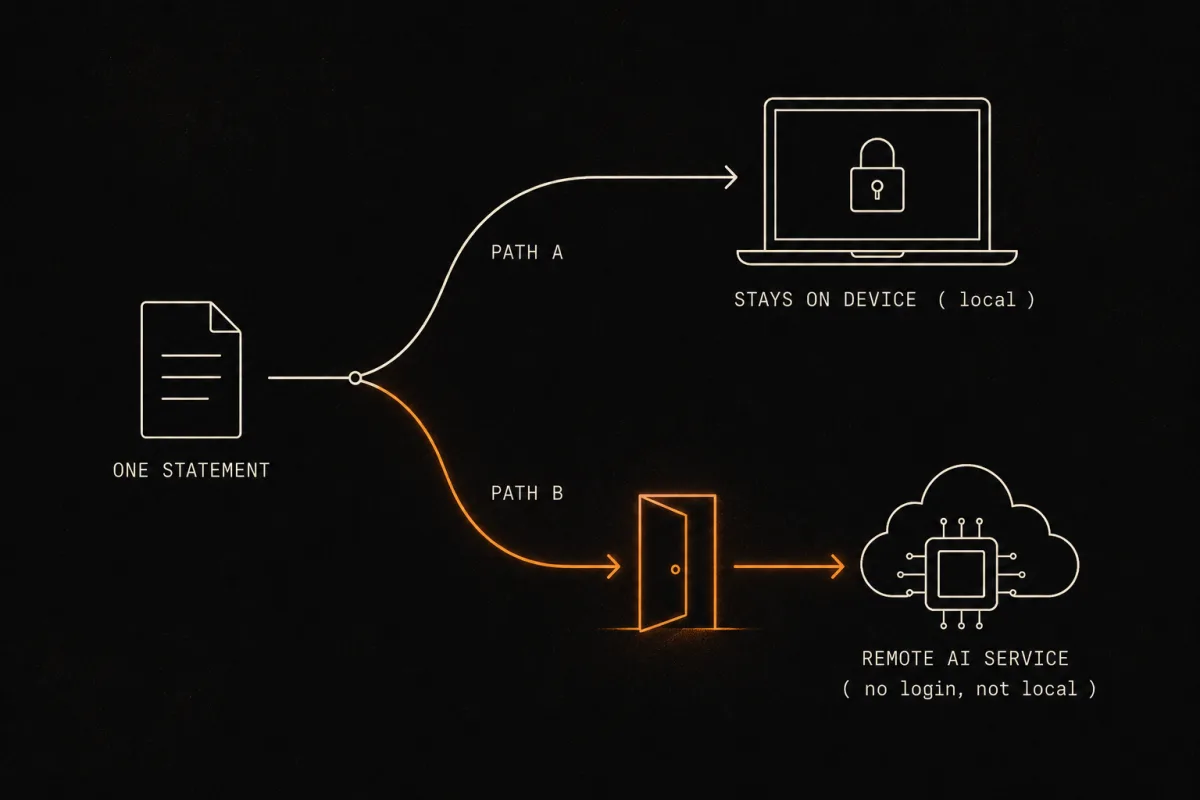
Path B is the same file you would sort by hand, except a tool reads it and hands you back the categorized list of recurring charges. No bank username, no password, no Plaid, no connection that lives on after you are done. You pick a statement, you upload it, you get a list.
Here is the part the rest of the internet leaves out, and it is the reason we built this page.
What actually happens to your file (the honest box)
No bank login is required. To be exact about it: when you import a statement into Subcut, the file is read by our AI service (Gemini and Claude), not on your phone. You hand over one statement, once. You are not handing over your bank password, and you are not opening a permanent connection to your account that can be re-pulled later.
So this path is "no login," but it is not "local." If you want nothing at all to leave your device, Path A above is the one for you. We would rather tell you that than let you assume something we cannot back up.
That distinction, "no login" versus "local," is the whole ballgame, and almost every competing article quietly conflates the two. Uploading a PDF to a cloud tool is genuinely "no bank login." It is not "nothing leaves your device." We win on one of those and not the other, and pretending otherwise would make us exactly the kind of company this page exists to warn you about.
What you get back is the list you would have built by hand: each recurring merchant, the amount, the cadence, grouped and labeled. On the first import, most people see a charge or two they had completely forgotten about. Given that Chase found 60% of people have a forgotten recurring payment somewhere, the surprising part is not that there is one. It is which one it turns out to be.
Once you have the list, the next move is to add up the annual damage, because the monthly numbers are designed to feel small. Our subscription cost calculator totals the yearly and ten-year cost so the $14.99 you almost ignored shows its real size.
The third path: aggregators, and why they fail the "no login" test
If you have searched this at all, you have seen the suggestion to "just use Rocket Money." It is a fine tool, and plenty of people are happy with it. It also does not belong on a "no bank login" page, stated neutrally.
To auto-detect recurring charges continuously, an aggregator connects to your bank or card account through a service like Plaid, which needs broad, ongoing read access to the account (Rocket Money's own security page describes the connection). That connection is standing: it can pull fresh data over time, which is the feature. The tradeoff is that you have granted a third party a persistent read line into your account.
That is not a scandal. It is a convenience a lot of people accept on purpose. But it is the opposite of what someone searching "no bank login" asked for, so the honest framing is simple:
- Aggregator: set it up once, then it watches automatically forever, but you have granted a standing third-party connection to your account.
- Statement import (Subcut): you upload one file, it gets read once, no password and no standing connection. The file does go to the AI service. We said so above.
- Manual spreadsheet: nothing leaves your machine at all, but the descriptor-decoding is on you.
If you want the watch-it-forever convenience without paying for Rocket Money, that is a real comparison worth making, and we lay it out in the free alternative to Rocket Money. If you specifically want no standing connection, the first two paths are your answer.
One short note on the law, because it explains the mess
You might reasonably ask why this is your job at all. For a moment, it almost was not. The FTC's "click-to-cancel" rule would have forced cancellation to be as easy as signup, but a federal appeals court vacated it in July 2025, days before it would have taken effect, on procedural grounds. It never became law.
The older federal backstop, the Restore Online Shoppers' Confidence Act (ROSCA), is still in force, and several states (California, Colorado, New York, Connecticut, Vermont, Illinois) have their own auto-renewal laws. Regulators do still bite: the FTC's 2023 settlement with the finance app Brigit included an $18 million penalty over dark-pattern cancellation flows (Consumer Finance Monitor, 2023). The law is why companies should make this easy. The patchwork is why, for now, you still have to read the statement yourself.
Frequently asked questions
Can I find my subscriptions without linking my bank account? Yes. You have two routes that never ask for a bank login. You can download 3 to 6 months of statements as CSV or PDF and sort them by merchant in a spreadsheet, which keeps everything on your own machine. Or you can upload one statement to a tool that reads it for you. Be aware that the second route does send the file somewhere: with Subcut, the statement is read by our AI service, not on your phone. Neither route needs your bank username or password.
How many months of statements do I need to catch every subscription? Three months catches monthly and quarterly charges. Six months is safer because it catches annual renewals, which only show up once a year and are the ones people forget. If you only pull one month, you will miss every quarterly and yearly charge, which are usually the bigger ones.
Why don't I recognize the charges on my statement? Billing descriptors use a processor or legal name instead of the brand you know. "APL*ITUNES" is Apple, "AMZN DIGITAL" is an Amazon service, and "PAYPAL *XXXX" is something billed through PayPal. The brand name is often nowhere on the line. Search the exact descriptor text, or check our guide on why a subscription shows a different name on your statement.
Is uploading my bank statement to an app safe, and what happens to the file? With Subcut there is no bank login, so you never hand over a password or a standing connection to your account. To be exact about the file itself: when you import a statement, it is read by our AI service (Gemini and Claude), not on your phone. You upload one statement, once. If you would rather nothing leave your device at all, use the manual spreadsheet method instead, where the file stays on your computer.
Do I have to use Rocket Money or link my bank to find recurring charges? No. Auto-detect tools like Rocket Money connect through Plaid, which needs broad, ongoing read access to your account. If you specifically do not want a standing connection to your bank, the manual spreadsheet method and a one-time statement import both avoid it.
What's the difference between "no bank login" and "private"? They are not the same thing, and most articles blur them. "No bank login" means no password and no standing connection that can re-pull your data later. "Private" or "local" means nothing ever leaves your device. The manual spreadsheet method is both. A statement import is no-login but not local, because the file is read by a remote service. We say so plainly rather than letting you assume.
Read the statement once, then stop re-reading it
The manual method is the honest baseline: a spreadsheet, an hour, and nothing leaving your computer. If you would rather hand over one file and skip the descriptor-decoding, Subcut imports a statement and gives you the categorized list of recurring charges in about a minute, with no bank login. The one thing we will always be straight about: that import sends the file to our AI service to read it, so it is not processed on your phone. You decide which tradeoff you want. We just refuse to hide it.
iOS - Free to use - No subscription required (ironic, we know).
Researched and written by the Subcut team. Last verified: 2026-06-17.
Spot something off, like a bank that changed its export flow or a source that moved? Tell us and we will re-verify.
Keep going
Sources
- C+R Research, Subscription Service Statistics and Costs (2022)
- Chase, Survey on recurring payments (2021)
- CNBC, Consumers spend $133 more monthly on subscriptions than they realize (2022)
- Rocket Money, Security and how account connection works
- U.S. Bank, How to find and manage recurring charges
- Consumer Finance Monitor, FTC settlement with finance app Brigit over dark patterns (2023)