 Subcut

Free Alternative to Rocket Money: Honest Picks
A free alternative to Rocket Money, sorted by what you want. First, the honest reason Rocket Money charges, then real free picks for each kind of person.
You installed Rocket Money, liked seeing your subscriptions in one tidy list, then went to cancel one and hit a wall: cancelling for you is a paid feature. So now you are here. The direct answer: there is no single best free alternative to Rocket Money, because "Rocket Money" is doing three different jobs. If you just want to see and cancel your subscriptions, Subcut is free with no premium tier. If you want full budgeting, Empower Personal Dashboard is genuinely free. If you refuse to link your bank at all, a manual tracker like Bobby is the honest pick. Below, we sort the choices by which person you are.
First, the part every other roundup skips: why a "free" app charges money at all. Understanding that tells you exactly what you are replacing.
Why Rocket Money costs money (and that's fine, once you know)
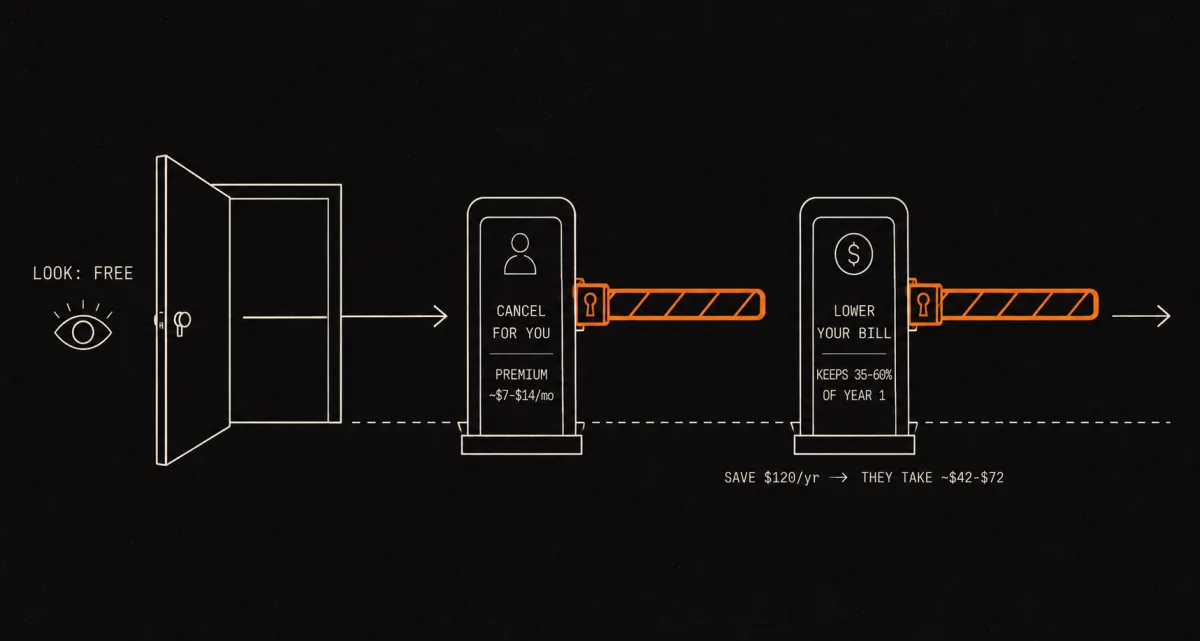
Rocket Money is free to look at your subscriptions. The two things people most want from it, someone to cancel for them and someone to lower their bills, are the two things that cost money. There are two separate paywalls, and naming them is the whole point of this page.
The Premium subscription. Rocket Money Premium uses pay-what-you-think-is-fair pricing, "typically ranging from $7 to $14 per month (subject to change)," after a 7-day free trial (Rocket Money, 2026). When TechRadar tested it, the suggested fee was $10 a month on a slider from $3 to $12, and crucially "the billing cycle is annual," which TechRadar flagged as a downside (TechRadar, 2026). Here is the line that sent you searching: free members can see their subscriptions, but in-app cancellation is Premium-only. Rocket Money's own pricing page puts it plainly. Free users "can track subscriptions but must cancel them on their own," while with Premium "we can cancel many unwanted subscriptions for you" (Rocket Money, 2026).
The bill-negotiation cut. This one is separate, and it surprises people. Bill negotiation is open to everyone, including free users, but if it works, "the fee is 35 to 60 percent of your first year's savings. After the first year, you keep all your savings" (Rocket Money, 2026). Run the numbers on a small win. Shaving $10 a month off a bill is $120 over the year, so the cut is roughly $42 to $72, charged upfront. The consumer-watchdog group Truth in Advertising framed it the same way, noting that "a $10/month 'savings' could cost you anywhere from $36 to $72 upfront" (Truth in Advertising). (Their example used the older 30 to 60 percent range; the current floor is 35 percent, so the low end today is closer to $42.)
None of this is a scam. It is a defensible business model: the company does work for you and takes a cut. But it means "free alternative to Rocket Money" is a real, answerable question. People want the see-and-cancel value without paying the Premium gate or handing over a slice of their savings.
A quick note on the app's history, because it explains the cut. Rocket Money used to be Truebill, acquired by Rocket Companies in December 2021 and rebranded to Rocket Money in August 2022. The success-fee model came along for the ride. And one more honest flag from Truth in Advertising: cancelling Rocket Money's own Premium can be harder than cancelling the things it cancels for you, since cancelling Premium does not delete your account (Truth in Advertising). That is an advocacy alert, not a regulatory finding, so read it as a heads-up rather than a verdict.
Pick by what you actually want
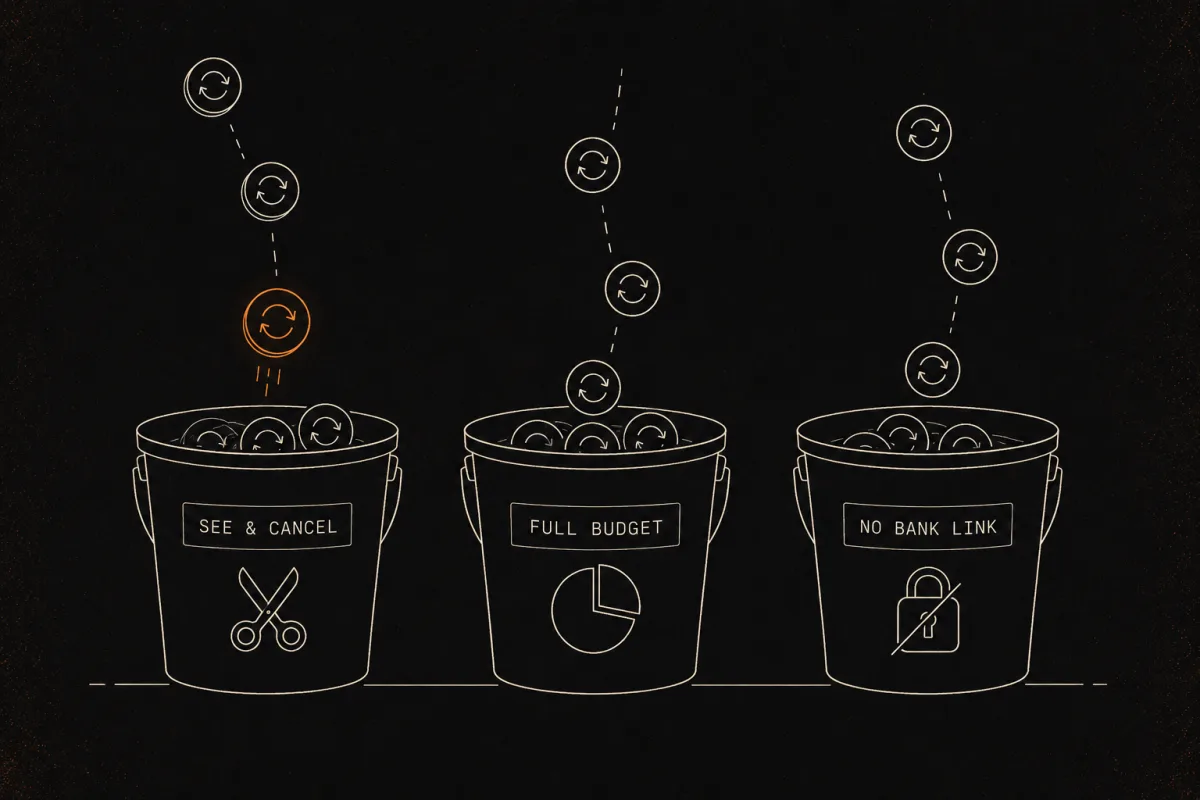
Most roundups hand you a list of ten apps and let you sort it out. That is the wrong format, because the person who wants "just show me my subscriptions" is not the same person who wants a Mint replacement, and neither is the person who refuses to link a bank. Find yourself in one of these three buckets and stop reading the other two.
Bucket A: "I just want to see and cancel my subscriptions"
This is most people, and it is the literal query. You want a list of recurring charges and a fast way to act on each one. You do not want a budgeting methodology. A dedicated subscription tracker beats a full finance suite here every time.
| App | Free? | Honest notes |
|---|---|---|
| Subcut | Yes. No premium tier, no negotiation cut. | The exact thing the query asks for. Free to see and act on your subscriptions. The optional statement-import feature uses a remote AI service to read your file, so it is fast but not on-device (more on that in Bucket C). |
| Bobby (iOS) | Free base, one-time in-app purchase for extras | Manual entry, no bank link, payment reminders. Good if you are happy to type your subscriptions in yourself. |
| Subby | Free with ads, small one-time Pro | Manual, no bank connection. |
| Rocket Money free tier | Free to see, paid to cancel | Worth naming honestly: if you only want the list, Rocket Money's free tier already gives it to you. The paywall is the cancel concierge and the negotiation cut, not the viewing. |
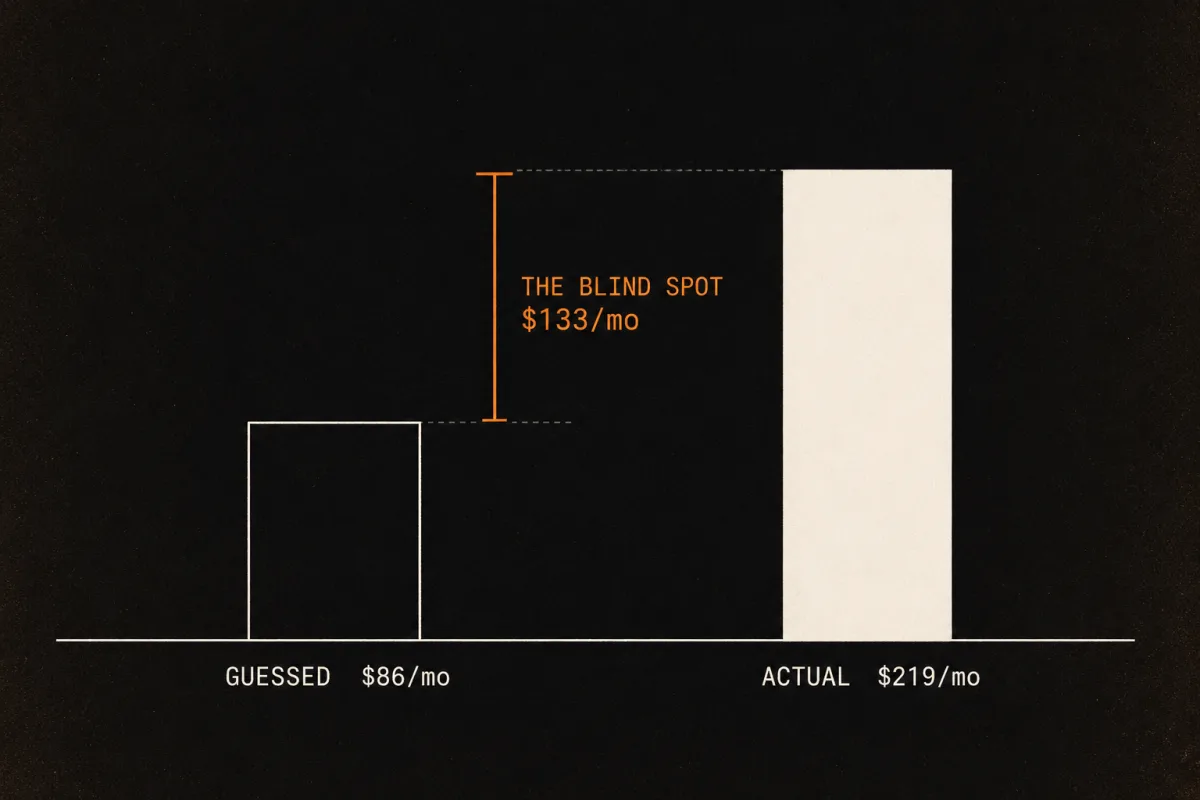
Here is why this matters in dollars. Almost nobody can estimate their subscription spend in their head. When C+R Research asked people to guess theirs in 2022, the average guess was $86 a month. The real number, once those same people itemized it, was $219, a gap of $133 every single month (C+R Research, 2022, reported by CNBC, 2022). It is not carelessness: 74% of people said recurring charges are easy to forget, and 42% admitted they had stopped using something but kept paying for it (C+R Research, 2022). On a first pass through a statement, Subcut lays the whole list out in front of you, which is usually where the forgotten ones jump out. That is exactly the $133 blind spot the C+R numbers describe.
The honest edge for Subcut is narrow and we will not oversell it: it is genuinely free, with no premium tier and no cut of your savings. That is the precise thing Rocket Money paywalls, which is the only reason we put ourselves in this bucket.
Bucket B: "I want full budgeting, not just subscriptions"
You want cash flow, net worth, categories, the whole Mint-replacement job. Be warned: most of these are not free, and roundups love to blur "free budgeting app" with "free subscription canceller." Different jobs.
| App | Free? | Honest notes |
|---|---|---|
| Empower Personal Dashboard (formerly Personal Capital) | Genuinely free | The strongest free full-finance pick. Net worth, investment tracking, cash flow. It monetizes by pitching wealth-management services you can decline, not by paywalling the dashboard. Weaker on day-to-day budgeting than Mint was. |
| PocketGuard | Free tier, paid is $7.99/mo or $34.99/yr | The closest feature match to Rocket Money: auto-detects subscriptions and shows a safe-to-spend number. The headline safe-to-spend feature is partly behind the paywall. |
| Monarch Money | Paid, $14.99/mo or $99/yr | A common Mint and Rocket Money upgrade pick. Name-checked everywhere, but it is not free. |
| YNAB | Paid, $14.99/mo or about $109/yr | Zero-based budgeting. A behavior-change tool, not a subscription canceller, and not free. |
| Quicken Simplifi | Paid | Strong mobile budgeting. Not free. |
If you are here because Mint closed, that is the right instinct. Mint shut down in March 2024, and Empower and Rocket Money are the two most-cited free-ish replacements. Of those, Empower is the closer match for full budgeting, since Rocket Money's free tier is really a subscription tracker with paid features bolted on.
Bucket C: "I refuse to link my bank"
You want no bank credentials stored anywhere. This is the bucket where we have to be most careful, because "I refuse to link my bank" often quietly means "do not send my data anywhere," and those are two different things.
| App | Free? | Honest notes |
|---|---|---|
| Bobby / Subby / TrackMySubs | Free or cheap | Pure manual entry. No bank link by design, so nothing leaves your device except what you type. Trade-off: you have to remember every subscription yourself. |
| TrackAllSubs | Free tier | You forward email receipts and it auto-populates. No bank connection. |
| Subcut (statement-import path) | Free | No live bank login and no Plaid connection. But to be exact: when you import a statement, the file is read by a remote AI service (Gemini and Claude), not on your phone. So this is no-login, not local. |
Read that last row twice, because it is the honest line most product pages will not write. Subcut solves the "no live bank login" problem: you never hand over a bank password or a standing connection that can re-pull your account later. It does not solve the "nothing ever leaves my device" problem, because the statement file is processed remotely. If your objection is specifically that you do not want any remote service touching your data, the honest recommendation is a manual tracker like Bobby or Subby, not us. If you are fine with uploading one file once in exchange for not typing everything in by hand, Subcut is the no-login-but-automated middle path. We would rather lose you to Bobby than mislead you.
You can almost always cancel for free yourself
Worth saying out loud, because it is what every free alternative is really helping you do: you can cancel directly with the merchant yourself, at no cost. The Premium cancel concierge is convenience, not necessity. And the law is increasingly on your side. State auto-renewal rules in California, Colorado, New York, Connecticut, Vermont, and Illinois require companies to let you cancel online and to send renewal reminders. (Federal regulators tried to mandate easy "click-to-cancel" nationwide, but that rule was struck down by the 8th Circuit in 2025, so the state laws are currently the stronger backstop.) The practical upshot: once a tool shows you the charge, the cancel itself is usually a few clicks on the merchant's own site, for free.
If you got here because a subscription already renewed before you could stop it, that is a different fight with its own playbook. We wrote a separate guide on what to do after a surprise auto-renewal, including when you can actually claw the money back.
How to find the subscriptions in the first place
Before you cancel anything, you need the full list, and the honest way to get it without a live bank login is your own statement. You can find every subscription from a statement without a bank login two ways: sort 3 to 6 months of statements in a spreadsheet, which stays entirely on your computer, or upload one statement to a tool that reads the recurring charges for you. Six months is the safer window because it catches annual renewals, the once-a-year charges people forget most.
Once you have the list, the number usually lands harder than the individual charges did. If you want to see your own version of the $133 gap, add up what your subscriptions actually cost and compare it to your gut estimate. The gap is the point.
The honest scorecard
| If you are this person | Free pick | Why |
|---|---|---|
| Just want to see and cancel subscriptions | Subcut | Free, no premium tier, no cut of your savings |
| Want a full Mint-style budget | Empower Personal Dashboard | The only genuinely free full-finance option here |
| Refuse to link your bank at all | Bobby or Subby | Manual entry, nothing leaves your device |
| Fine with one file upload, no login | Subcut import | No bank login, but the file is read remotely, not on-device |
| Only ever wanted the list | Rocket Money free tier | It already shows it; the paywall is the cancel concierge |
Other roundups will point you elsewhere, and a few are worth reading. Rob Berger's widely cited list of Rocket Money alternatives is solid on the budgeting suites, though four of its five picks are paid and it never explains why Rocket Money charges in the first place. That gap is exactly what this page exists to fill.
Frequently asked questions
Is there a completely free alternative to Rocket Money? Yes, but the right one depends on what you want. If you just want to see your subscriptions and cancel them, Subcut is free with no premium tier and no cut of your savings. If you want full budgeting, Empower Personal Dashboard is genuinely free. Most other budgeting picks, including Monarch, YNAB, and Quicken Simplifi, are paid, so be careful when a roundup calls them alternatives.
Why does Rocket Money charge money if it's a free app? It is free to look at your subscriptions. The two things people most want from it cost money. Cancelling a subscription for you in the app is a Premium feature, priced pay-what-you-think-is-fair at $7 to $14 per month with a 7-day trial. Lowering a bill for you is a separate deal: Rocket Money keeps 35 to 60 percent of your first year of savings, charged upfront, only if it works. Both figures come from Rocket Money's own pricing page.
Can you cancel subscriptions on Rocket Money for free? Not inside the app. Rocket Money's own pricing page says free users can track subscriptions but must cancel them on their own, while Premium can cancel many unwanted subscriptions for you. You can always cancel directly with the merchant yourself for free, which is exactly what most free alternatives help you do.
What's the best free alternative to Rocket Money for just tracking subscriptions? A dedicated subscription tracker rather than a full budgeting suite. Subcut, Bobby, and Subby all do this without a premium gate on the core list. Match the tool to the job: if you only want to see and cancel recurring charges, you do not need a Mint replacement.
Is there a Rocket Money alternative that doesn't link to your bank? Yes. Manual trackers like Bobby, Subby, and TrackMySubs store no bank credentials at all because you type the subscriptions in yourself. Subcut can read a statement file instead of a live bank login, but to be exact, that file is processed by a remote AI service, not on your phone. If your objection is any remote service touching your data, a manual tracker is the honest pick.
What happened to Mint, and is Rocket Money the replacement? Mint shut down in March 2024. Rocket Money and Empower are the two most-cited free-ish replacements. Empower is the closer match if you want full budgeting and net-worth tracking, while Rocket Money leans toward subscription tracking with paid cancellation and bill negotiation on top.
Does Rocket Money's bill negotiation actually cost extra? Yes, and it is separate from Premium. If Rocket Money lowers a bill, it keeps 35 to 60 percent of your first-year savings, charged upfront, and only if it succeeds. So cutting $10 a month off a bill saves you $120 over the year and costs roughly $42 to $72 right away. After the first year you keep all the savings.
Find what you're paying for, then decide
Most roundups want you to download a budgeting suite. You probably just want to know what is hitting your card and stop the charges you forgot about. That is the whole job, and it should not cost a premium tier or a slice of your savings. Subcut shows every recurring charge so you can cancel the ones you do not use, then keeps an eye on the renewals so the next surprise charge is one you saw coming.
iOS - Free to use - No subscription required (ironic, we know).
Researched and written by the Subcut team. Last verified: 2026-06-17.
Spot something off, like a price that changed or a feature that moved behind a paywall? Tell us and we'll re-verify.
Keep going
Sources
- Rocket Money, How much does Rocket Money cost (2026)
- TechRadar, Rocket Money review (2026)
- C+R Research, Subscription Service Statistics and Costs (2022)
- CNBC, Consumers spend $133 more monthly on subscriptions than they realize (2022)
- Truth in Advertising, Truebill / Rocket Money ad alert
- Rob Berger, Rocket Money Alternatives