 Subcut
Why a Subscription Shows a Different Name on Your Statement
Why does my subscription show up under a different name on my statement? Four reasons a charge name lies, plus a method to trace any descriptor back.
You scan your statement, stop on a line, and your stomach drops a little. PADDLE.NET* SOMETHING. FSPRG.COM. SQ* .... You do not remember signing up for any company by that name, and for a second you are sure your card got skimmed.
Here is the short answer. The name on your statement is almost always the payment plumbing, not the app you actually paid. Most charges that look wrong are one of four things: a payment-processor prefix, a merchant of record (a legal reseller that technically sold you the product), a parent-company billing name like APPLE.COM/BILL that covers many products at once, or plain character truncation that chopped the real name to fit. All four are normal. None of them mean fraud on their own.
The trouble is that almost every page online explains one descriptor at a time. They will tell you what PADDLE.NET is, then leave you stranded the next time you see DRI* or a name that got amputated at 22 characters. This page does the opposite. It teaches the four reasons a charge name lies, gives you a reference table of the real processor prefixes, and hands you a method to decode any descriptor you will ever see, including ones not on the list.
This matters more than it looks. An unrecognized charge is the single most common reason people file a card dispute against a charge that was perfectly legitimate, and it is also the most common reason a forgotten subscription stays forgotten. In its 2025 Cardholder Dispute Index, fraud-prevention firm Chargebacks911 found that 55.70% of cardholders said at least one recent dispute came from an unrecognized transaction, and 39.49% were often confused by unclear billing descriptions. A name you cannot decode is a name you either wrongly dispute or quietly keep paying. Let us fix that.
Reason 1: The name belongs to the payment processor, not the store
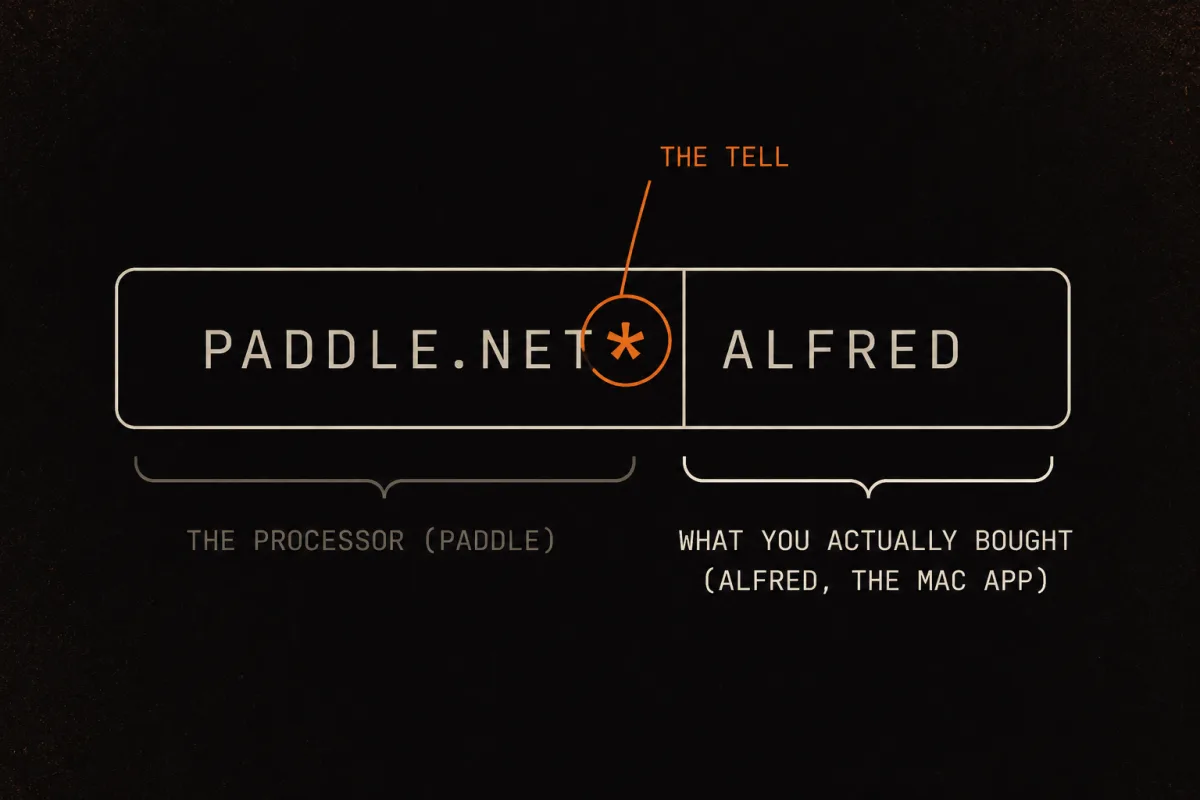
A lot of apps do not run their own card processing. They route payments through a platform, and that platform's name is what your bank sees. The format is usually a prefix, an asterisk, then the merchant or product, often truncated: ABC* Description. The asterisk is the tell. Left of it is the processor; right of it is what you actually bought. This dynamic-descriptor format is documented in the Wikipedia entry on billing descriptors, which traces the rules back to Visa's Merchant Data Standards Manual.
Fully resolved, PADDLE.NET* ALFRED reads as "Alfred, the Mac launcher app, billed through Paddle." The developer never appears. Alfred's own support team gets asked this so often that they publish a standing answer titled Why is the PADDLE.NET* ALFRED charge on my card statement. That is the giveaway that this confusion is mass-scale, not your personal mistake.
Reason 2: A merchant of record is the actual seller
Reason 1 is about formatting. Reason 2 is the deeper reason the processor's name is even there.
A merchant of record (MoR) is the legal entity that sells the product to you. The app developer hands the entire payment side to the MoR, which collects your money, handles sales tax and VAT, issues the receipt, and processes refunds. FastSpring puts it plainly in its own explainer: a merchant of record is the legal seller of the product, even though a completely different company built the software. Paddle says the same about itself: when you buy, Paddle is the one you are purchasing from and who is responsible for charging you for the product you've bought.
So the statement name is legally correct. Paddle, FastSpring, and Digital River really did sell you the thing. The developer was the manufacturer; the MoR was the shop. For these three, the processor prefix (Reason 1) and the merchant of record (Reason 2) travel together. Worth understanding both, because it explains why the name will not change no matter how many times you check.
Reason 3: It is the parent company's legal name, not the brand
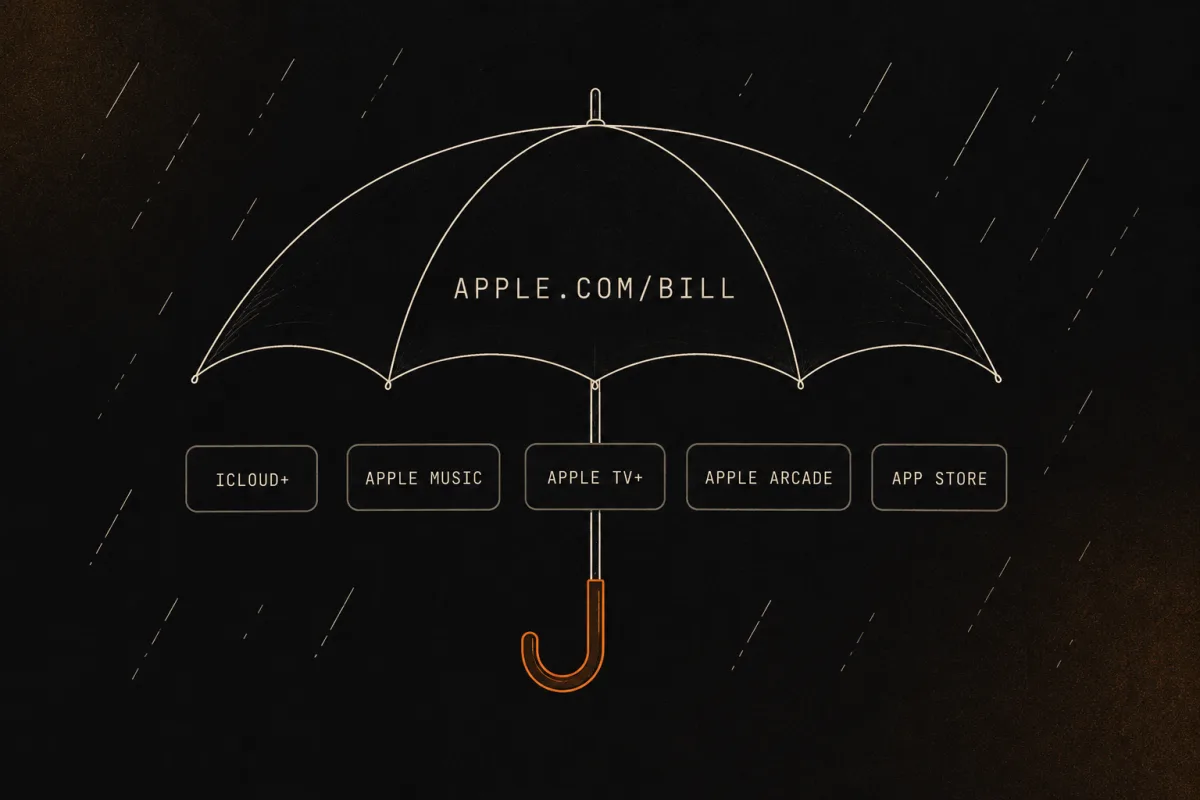
Sometimes the charge is not a processor at all. It is the corporate parent billing for many products under one generic descriptor.
APPLE.COM/BILL is the cleanest example. It is Apple's umbrella for everything: App Store apps, in-app purchases, iCloud+, Apple Music, Apple TV+, Apple Arcade. The specific product never reaches your bank line. As Apple's own support page on apple.com/bill charges explains, the product lives in your purchase history, not on the statement. The same goes for GOOGLE * (Play Store, YouTube Premium, Google One, Workspace) and AMZN descriptors like AMZN DIGITAL or AMZN MKTP, any of which could be Prime, Kindle Unlimited, Audible, a Marketplace order, or AWS.
The mechanism here is by design. One company bills for dozens of distinct services under a single name, so the descriptor is generic on purpose and the product identity is parked in the vendor's order history. If APPLE.COM/BILL is your specific puzzle, we wrote a whole page on it: what the APPLE.COM/BILL charge actually is and how to find the app behind it.
Reason 4: The name is right, it just got chopped
This one confuses people the most and needs the least action, because nothing is actually wrong. The name is just amputated.
Card-network billing descriptors are short. They typically run 20 to 30 characters, with 25 a common US maximum, and the merchant-name field often around 22 characters. A longer business name simply does not fit, so it gets cut. PAYPAL *FLEET SPOR is "Fleet Sports via PayPal," sliced off mid-word. Square gives a business only about 20 characters after the SQ* prefix, which is why a longer shop name gets truncated and Square sometimes appends a gosq.com link when the line is too vague to identify.
It gets worse: different banks re-truncate differently, so the same subscription can show two different names on two different cards. One issuer might display 21 characters while another cuts you off earlier. If a charge looks unfamiliar on one card and you recognize it on another, this is usually why.
The reasons stack
These four are not mutually exclusive. A single line like PADDLE.NET* SOMELONGAP is Reason 1 (a processor prefix), Reason 2 (Paddle is the merchant of record), and Reason 4 (the app name got truncated) all at once. Decode each layer and the mystery dissolves.
Reference table: what the common prefixes actually mean
Here is the centerpiece. Every row below traces to a public, checkable source, either the processor's own lookup tool or a vendor support page. This is a teaching reference, not a directory; the point is the method, not the length.
| Descriptor you see | Who that is | What it actually means | How to trace it back |
|---|---|---|---|
PADDLE.NET* / Paddle.com | Paddle (merchant of record for many SaaS and Mac apps) | A software or subscription purchase Paddle billed for a developer | Use the transaction lookup at paddle.net, or search email for a Paddle receipt. (Paddle) |
FSPRG.COM / FastSpring / FS* | FastSpring (merchant of record for software and SaaS) | A software license or subscription renewal sold via FastSpring | Use the FastSpring "look up a charge" tool. |
DRI* / Digital River | Digital River (merchant of record, winding down since 2025) | A digital purchase Digital River processed for a software vendor | Find the vendor's receipt in your email and contact that vendor. Digital River's self-serve lookup is unreliable post-2025. |
SQ* (sometimes gosq.com) | Square (in-person and online sellers) | A purchase from a business using Square; the seller's name follows, often cut to ~20 chars | Read the name after SQ*. If too vague, open the gosq.com link to Square's receipt lookup. |
PAYPAL * / PP* | PayPal | A purchase funded through PayPal; merchant name follows, truncated to fit ~22 chars | Log into PayPal, open Activity, match by date and amount. PAYPALINST XFER means bank-funded with no merchant name shown. |
BT* | Braintree (PayPal-owned gateway) | A card payment routed through Braintree for some merchant | Read the merchant name after BT* and check your email receipt. |
APPLE.COM/BILL | Apple (umbrella for all Apple digital billing) | Any App Store app, in-app purchase, or Apple subscription (Music, iCloud+, TV+, Arcade) | Open reportaproblem.apple.com for every purchase by date and amount; manage subs in Settings. |
GOOGLE * | Google (Play, YouTube, Google One, Workspace) | A Play Store purchase or Google subscription; service usually named after the prefix | Google Play, then Payments & subscriptions, then Budget & order history. |
AMZN ... (AMZN DIGITAL, AMZN MKTP) | Amazon (parent for many services) | Prime, Kindle Unlimited, Audible, a Marketplace order, or AWS | Amazon, then Your Orders or Memberships & Subscriptions. Audible and AWS bill separately. |
The universal trace method (works on any descriptor)
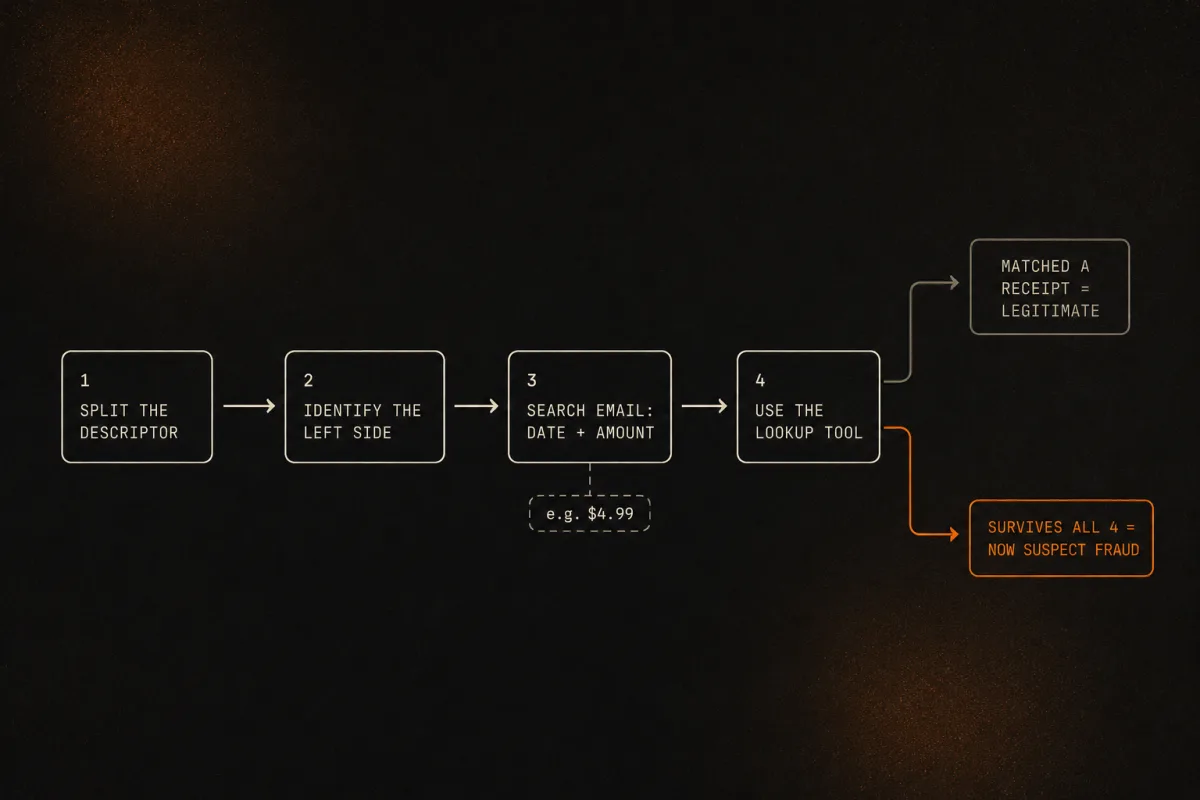
The table covers the common ones, but you will eventually hit a prefix that is not on it. Here is the four-step decode that works on anything:
- Split the descriptor. Find the asterisk or the obvious prefix. Left of it is the processor or platform. Right of it is the merchant or product, maybe truncated. No asterisk usually means a direct merchant or a parent-company umbrella name.
- Identify the left side. Match it against the table above, or search the exact prefix. Processor prefixes are a small, stable set, so this step gets faster the more you do it.
- Search your email for the date and amount, not the statement name. The vendor's own receipt almost always names the real product even when the bank line does not. This is the highest-yield step and most people skip it.
- Use the processor's lookup tool when email fails. Paddle, FastSpring, Apple, PayPal, and Google all built these flows specifically to answer "what was this charge," which tells you how common your confusion is.
If a charge survives all four steps and you still cannot place it, that is when it earns suspicion. Only then treat it as possibly unauthorized and contact your bank. We walk through that escalation in our guide on what to do about a recurring charge you don't recognize. Do not lead with a dispute, because the overwhelmingly likely outcome is a legitimate, decodable subscription, and a wrongful chargeback can get your Apple or Google account locked.
Why decoding the name actually matters
This is not just tidiness. A charge you cannot name is a charge you do not cancel.
C+R Research found in 2022 that consumers guessed they spent about $86 a month on subscriptions, while their itemized actual spend averaged $219. That is a $133 gap, roughly 2.5 times what people thought. The same survey found 74% said it was easy to forget about recurring monthly charges, 42% had kept paying for a service they had stopped using, and 72% put all their subscriptions on autopay. An undecodable descriptor is exactly how a charge slips into that forgotten pile: you cannot cancel what you cannot identify.
The emotional arc is predictable, too: unfamiliar name, mild panic, assume fraud, almost dispute, then realize it was a legitimate app you signed up for months ago. The trace method above short-circuits that loop before you do something you regret.
How Subcut does the decoding for you
The four-step trace works, but doing it by hand for every line on a statement is tedious. That is the job Subcut's statement import was built for. It reads your statement and turns PADDLE.NET* ALFRED back into "Alfred," stripping the processor prefixes, corporate suffixes, and truncation noise, then matching the cleaned-up text against a catalog of real apps. It is the four-step trace method on this page, automated.
One honest note, because it is the kind of thing we would want told to us. The import does not run on your phone. When you import a statement, the file goes to our import worker, which uses AI (Gemini and Claude) to read the descriptors and resolve them to clean app names, then sends the results back. We will not tell you it stays on device, because it does not. We think being straight about where your data goes is the bare minimum, and frankly more useful than a comforting fib.
A large share of the charges we read show up under a processor or aggregator name rather than the real app, and the prefixes from the reference table above are the ones we decode again and again. Those are exactly the lines a person scanning a statement is most likely to miss.
Once you understand descriptors, the natural next move is to find all of them at once. Here is how to pull every subscription off a bank statement without handing over a login.
See the whole picture in about a minute. Subcut reads your statement (the file goes to our import worker, it does not stay on your phone) and turns cryptic lines like
FSPRG.COMandPADDLE.NET* ALFREDback into the real apps, so you can see what you are actually paying for and decide what stays.iOS · Free to use · No subscription required (ironic, we know).
Frequently asked questions
Why does my subscription show a different company name on my bank statement?
Usually because the name belongs to the payment plumbing, not the app. Many apps bill you through a processor or a merchant of record (Paddle, FastSpring, Digital River), and that company's name is what lands on your statement. The other common causes are a parent-company legal name (Apple, Google, Amazon billing for many products under one descriptor) and plain character truncation, where the real name got chopped to fit a 22 to 25 character limit.
What is a PADDLE.NET charge on my card?
Paddle is a merchant of record that sells software and subscriptions on behalf of app developers, so legally you bought from Paddle even though a different company made the app. A line like PADDLE.NET* ALFRED means you paid for Alfred, the Mac app, billed through Paddle. To confirm it, use the transaction lookup at paddle.net or search your email for a Paddle receipt.
What does FSPRG or FastSpring mean on my statement?
FSPRG is FastSpring, another merchant of record for software and SaaS. A FSPRG.COM or FastSpring line is a software license or subscription renewal sold through FastSpring on a developer's behalf. FastSpring runs a public charge lookup tool where you enter the last digits of your card and the amount to see exactly what the charge was for.
What is the DRI or Digital River charge on my bank statement?
DRI is Digital River, a merchant of record that processed digital purchases for many software vendors. A DRI* line is a software or subscription purchase Digital River billed on a vendor's behalf. Digital River began winding down in 2025, so its self-serve lookup is unreliable. Trace a DRI charge through the vendor's own receipt in your email, then contact that vendor directly.
Why does APPLE.COM/BILL not say which app I paid for?
APPLE.COM/BILL is Apple's umbrella descriptor for everything it bills: App Store apps, in-app purchases, iCloud+, Apple Music, Apple TV+, and Apple Arcade. The specific product never appears on the bank line by design. It lives in your Apple purchase history. Open reportaproblem.apple.com to see every purchase by date and amount, or check Settings then your name then Subscriptions.
What does SQ* mean on my statement?
SQ* means the seller uses Square to take payments. The name after SQ* is the actual business, often truncated to about 20 characters. If that name is too vague to place, Square usually appends a gosq.com link that opens its receipt lookup so you can see the full merchant and itemized purchase.
Is a charge from a payment processor I don't recognize a scam?
Most of the time, no. An unfamiliar processor name is the single most common reason people almost dispute a charge that was actually a legitimate subscription. Trace it first: split the descriptor at the asterisk, identify the processor on the left, search your email for the date and amount, and use the processor's lookup tool. Only treat it as unauthorized if all of that turns up nothing.
Keep going
Sources
- Paddle: Why has Paddle charged me? (merchant of record explainer + paddle.net lookup)
- Alfred KB: Why is the PADDLE.NET* ALFRED charge on my card statement?
- FastSpring: Look up a charge
- FastSpring: What is a merchant of record and why you should care
- Apple Support: Get help with charges from apple.com/bill
- Wikipedia: Billing descriptor (character limits, dynamic descriptor format)
- C+R Research: 2022 subscription service statistics and costs
- Chargeback.io: chargeback statistics (CB911 2025 Cardholder Dispute Index)